Tool Bar
Common actions needed to edit scripts directly are placed in this top bar.
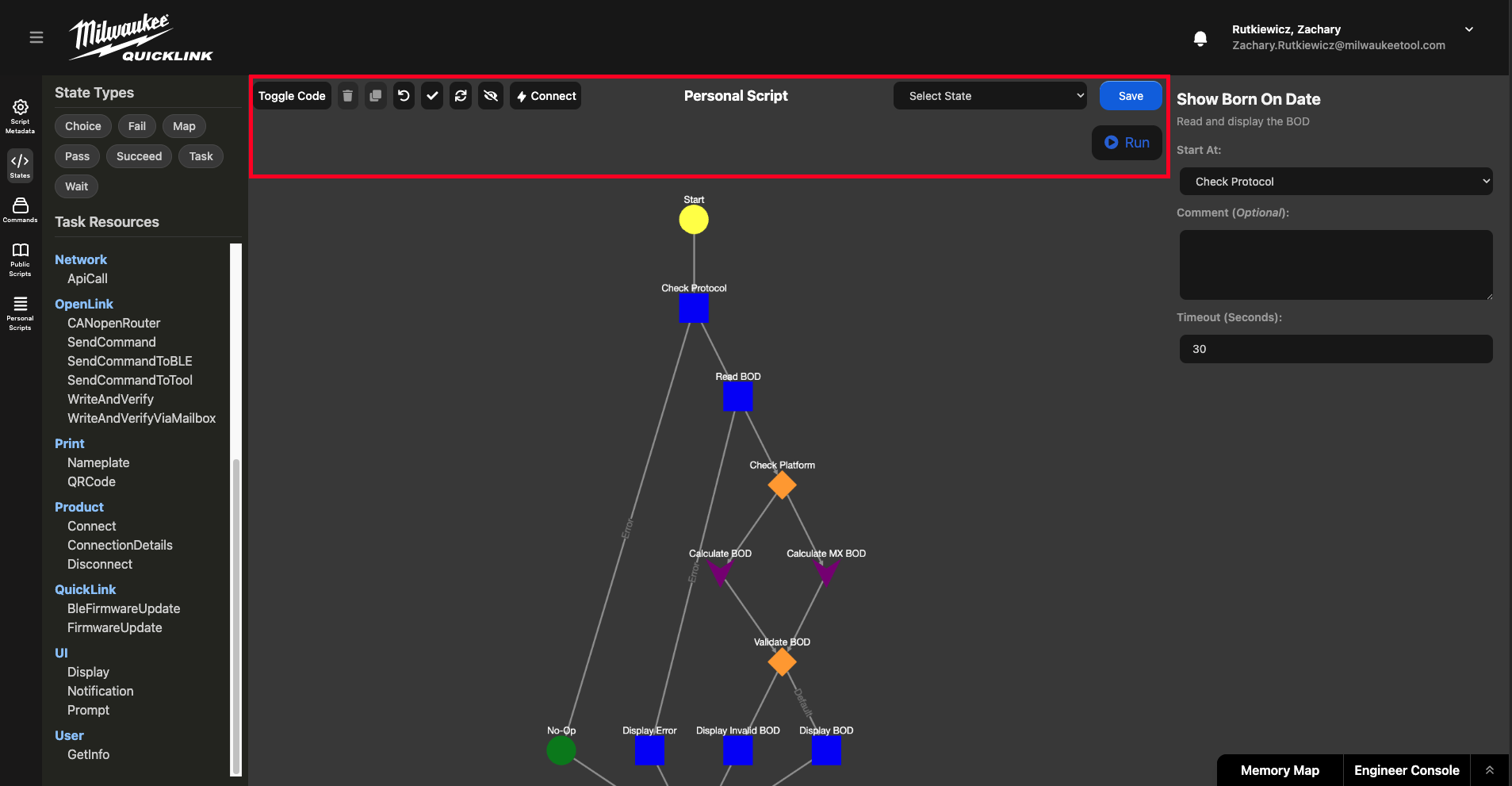
From left to right:
-
Toggle Code/Graph: Toggles whether the current editor is the graphical node based editor or the code editor for raw JSON
-
Trash: Deletes the selected state from the script (Need to select the state either by clicking in the graph editor or via the state dropdown)
-
Duplicate: Duplicates the selected state into the graph.
-
Undo: Undoes one previous action. Can only undo just the previous action, not a series of actions.
-
Validate: Runs the validator on the current state machine, will return errors if they exist in the script.
-
Refresh Layout: Cleans up the graphical representation of the script and sets the nodes in their default layout given their relationships.
-
Toggle Real-Time Validation (On by default): Allows toggling of real-time validation. As new code is typed in the code editor it is (by default) validated and errors immediately present themselves if they exist. Sometimes it may be helpful to disable this if writing more complex scripts that take more time and troubleshooting.
-
Connect: Allows for a connection method to be chosen then connects to a tool for testing the script or tool using the current script.
-
Select State: Enables the selection of a state without using the graphical node editor.
-
Save: Saves the current script to the database
-
Run: Runs the script in the current window on the currently connected tool.